Jeff Zych

Claude Code is Re-shaping My Design Process

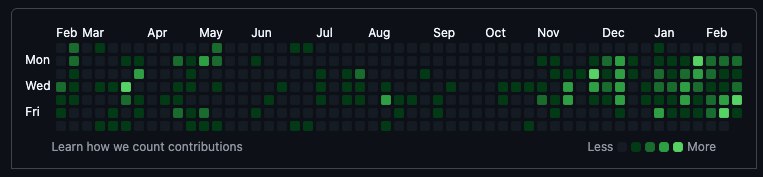
Git commits graph showing increased activity

This image tells the story: the uptick in commits is me designing and shipping with Claude Code. I’m using it daily. Likewise, my usage of Figma has fallen significantly.

Claude Code lets me describe the intended user experience — the use cases, expected behavior, how a feature might evolve — and it figures out how to build it. This is basically how I’ve always worked with engineers. Only I’m in control of the engineer and they’ll do whatever I say 😄

Now I skip mid-fi mockups completely and go straight to CC and with some good prompting (which comes easily from spending a career describing intent and giving context). I can get a pretty good version working in a matter of minutes. Then keep shaping it with CC to finalize the functionality and interactions and UI.

Directly editing a working version of a feature with real data is great because little things that improve the overall UX jump out much more quickly compared to static mockups, or even clickthrough prototypes. Like sorting, or filtering, or when data is too long or too short, and so on.

My new (and still evolving) process

My process has changed significantly over the past few months.

For minor features — like quality of life improvements, adding a search field to a list, anything using well-worn patterns and existing components — I skip Figma entirely and go straight to Claude Code. No wireframes, no handoff. And Claude does great at using the right components and patterns, especially with the right prompting. (And even sometimes without good prompting; Opus 4.6 is crazy good at understanding the codebase and doing the right thing even when you aren’t explicit about it).

For bigger features with large solution spaces, I still do upfront discovery work and solution exploration. But even that looks different now. I write out the problem, use cases, the “shape” of a good solution (for example, “feels fast and frictionless”, “doesn’t make the user do extra work”, etc.), and potential approaches. Then I take this to Claude (just regular Claude chat, not CC) and ask for more ideas. It usually has a couple interesting ones I hadn’t considered, plus some clunkers that don’t fit the context.

From there I’ll have Claude generate interactive artifacts of my favorite directions — these are great for getting a feel for the solution myself, and for sharing the good ones with teammates and getting their input. I’ll also do quick lo-fi wireframes in Figma to try out layouts or simple ideas for cases when that’s easier than writing a prompt, waiting for Claude to do its thing, tweak and iterate via more prompting. (Sometimes it’s just faster to move some boxes around yourself).

After iteration and team discussion and getting user feedback to finalize the approach, I go to Claude Code with a few mockups to build and polish it directly in code — getting all the states just right, tuning the interactions, etc.

No handoffs. No wasteful artifacts. Just working in the final medium and firing off a PR.

Figma still wins for visual exploration. Trying color combos, typography options, new components — it’s much easier to compare those side by side, zoom in and out, move things around. That kind of exploration in code is painful. But most of my work is in existing products with existing design systems, so that’s a smaller slice of the process now.

What hasn’t changed is focusing on users, their needs, understanding the problem, exploring lots of options, iterating, testing, and polishing. But that middle section is primarily in Claude Code now. And I can see that through to actually getting the code in users hands.

Where will we be in a year? It’s impossible to predict. But I’m excited to keep trying new tools and ways of working and evolving my process. There’s never been a more exciting time to be a designer.

My Claude Prompt for Writing Case Studies in Days, Not Weeks

I used to spend weeks, sometimes months, writing case studies. Going through notes, screenshots, Figma files, project docs—trying to find a narrative thread and pull together something coherent. Then the writing and editing and refining and eventually publishing something that’s probably too long anyway and that hardly anyone reads in full.

In fairness, I spent too much time on it. Overworked it. Especially for something where people are mostly just looking at the screenshots. But even so, the time it took was a big barrier to me actually publishing work on my website.

So for some recent projects I enlisted Claude as my writing assistant. The first one took trial and error, but after that I got it down to a solid process that has me finishing case studies in days rather than weeks.

The Process

The key is that I’m writing down all my stream of consciousness raw thoughts and having Claude turn that into a written narrative for me. Refining the raw thoughts into a finished product was by far the longest part of the process for me, and this dramatically cuts that down. The key is in having a good prompt (read on!).

Mise-en-place

To start, gather all your raw materials. Notes from the project, screenshots, PRDs, anything with relevant context.

Then, write down all the project context and beats for how the project unfolded. Just go stream-of-consciousness. Don’t worry about formatting or structure or flow. Just write. Claude will sort it all out for you. Include as much context as you can. The project context, state of the business, what prompted the work, how it connects to business goals, who you worked with, how long it took, what you actually did (wireframes, prototypes, research, whatever), major design decisions and why, the impact, and so on.

One thing I’ve learned from working with AI: the more context you give it, the better output you get. Don’t be shy about including anything that seems relevant.

Finally, upload this to Claude, as well as other relevant materials unearthed in step 1, and ask Claude to refine it into a finished case study for you. The key here is a good prompt.

The Prompt

The most important element is having a good prompt to tell Claude exactly what you want. I spent time refining this to get output that matches my intent, which may not be yours, so you may not want to use it exactly but it should be a good starting point:

You are an expert writer tasked with writing a polished product design case study meant to appeal to design recruiters and design managers. It should sell the value and skills of me as a product designer. This case study highlights [specific skills for this project—e.g., strategic research, 0-1 product work, etc.]. The length should be 1,000-1,500 words.

Review all the uploaded screenshots and documents before starting to write. Review my website, [your website here, if you have one], for how I sound and write the case study in my voice. If you’re missing details or information, ask me for it.

Revise the attached outline into a polished case study. Start with the end (the outcome and what I did to achieve it; brief description of the challenge), then go through the outline. Summarize at the end with the outcome again, connected to what I did and what I learned.

Some key aspects of this prompt:

  • It gives Claude a role (expert writer)
  • It provides a task (write a polished case study)
  • It says who Claude is writing for (recruiters, design managers)
  • I specify length
  • I explicitly state the skills I want to highlight (this changes per project)
  • I tell it to review uploaded docs and screenshots first
  • I tell it to ask for missing information
  • I specify the structure I want

I also use Projects in Claude, which I highly recommend. In the project context I include info about my website, writing style, and tone of voice so the output sounds more like me.

Then I send it off and sip my coffee.

Claude usually asks clarifying questions back—I ask it to in the prompt, but I also have my personal Claude settings configured to ask for missing information (which I also recommend you do). After answering those, it outputs a pretty solid first draft. Something that would have taken me weeks of writing and editing and refining.

Editing

I say “pretty solid” because I don’t find it usable as-is. Some sentences still sound like AI-speak at times (hard to define precisely but you know it when you see it). It sometimes makes up details to fill gaps or make the story sound stronger, even if they aren’t in the outline or supporting docs. Sometimes there are sections I don’t like or phrasing that feels off.

So the next step is editing. For major stuff I’ll ask Claude to revise (e.g., “make this section more XYZ,” “cut this,” “add that”). But most of it is by hand—making it sound less like AI, more like me, making sure the details are accurate and the beats are compelling.

One More Pass

Finally, I start a new chat, upload the draft, and tell Claude to read it as if it were a hiring manager for product designers. I ask for strengths and weaknesses. Does it sound compelling? What would make it stronger? And any other questions specific to this case study, e.g. skills you want highlighted. Just like in design crits, ask specific questions to get good, usable feedback.

This helps catch missing context I may have cut and adds a final layer of refinement. Sometimes it suggests things that don’t exist, like “add more business metrics,” but even so this is a useful final gut check.

Then I publish. 🚀

Feel free to check out some example case studies.


Using Claude this way has been a game changer and dramatically lowers the bar for me putting more work on my site, which I’m hopeful will translate to sharing more work. If you use any of this process or the prompt yourself, please let me know!

2025 Reading List

Let’s start with some stats: I read 13 books this year, which is 2 fewer than last year. 4 of those were fiction, which is 1 higher than last year! Not having a behemoth like Infinite Jest backing everything up helped me knock down 33% more fiction books. As usual, Art/Design/Creativity books dominated my mindshare (7 in total).

As usual, you can view my entire list and what I’m currently reading on the public Notion site. And here’s my posts for 2024, 2023, 2022, and… I’ll stop there.

Faves

In no particular order, some faves include:

  • The Perfectionists Guide to Losing Control by Katherine Morgan Schafler. I just wrote a blog post of my favorite quotes from this one, but this had a lot of advice to help me harness my perfectionist tendencies for positive ends rather than try to suppress them. Highly recommended to any recovering perfectionists, high achievers, type A folks, etc.
  • I liked all the fiction books I read (Big Swiss [funny, odd, thought-provoking, unique], Cloud Atlas [which I’ve wanted to read forever and really enjoyed his writing, so I’m glad I got to this. Cool narrative structure too], and A Visit From the Goon Squad [time is definitely a goon, man. I recently learned there’s a follow up to this so that’s going to the top of the to-read list]), with the exception of Underworld by Don DeLillo. Unlike Cloud Atlas, I found the novel’s structure to be confusing and hard to follow (after I had the structure explicitly laid out for me by the author it made more sense, but that was after I read it and, at best, it would have marginially helped me read the book). It was sprawling and hard to follow. It spans decades. Some sections had no names so you had to figure out the where/when/who of the scene via context clues, which was too much work thank you. I have a lot of gaps in knowledge of this book because I regularly could not remember who was who or what they were doing lol. Also the quote-unquote “plot” is thin and doesn’t have much resolution. Thematically has some interesting ideas but they never quite “clicked” for me. I need to read a summary of what happened and key takeaways and then re-read it and maybe it will click (but no I won’t actually re-read it, too many other books).

    What kept me going? DeLillo is an excellent writer and some of this turns of phrase and ways of describing people/moods/emotions is so spot on. I’ve read some of his other work and really liked it, and this is supposed to be his best so I was disappointed and surprised to not like it more.

    Anyone else out there have a different take? Sound off in the comments! (lol there are no comments but you’ll find a way to reach me).
  • Make (Sneaky) Art by Nishant Jain. Another one from which I wrote a blog post of selected notes. I’m including it here not because it’s the best book on drawing or sketching or anything, but because it lowered the bar on sketching and has helped me start sketching what I see more, even if it’s for 5 minutes or something small or just for me.
  • Also, the Saul Bass book was really well done and beautiful to look at. I didn’t realize how sprawling is oeuvre was so it was inspiring to see all his work collected in one place.

The List

  • The Perfectionists Guide to Losing Control by Katherine Morgan Schafler 👍
  • Learn More Faster by Michael Margolis 👍
  • Cue The Sun! The invention of reality TV by Emily Nussbaum 👏
  • An Unfinished Love Story: A personal history of the 1960s by Doris Kearns Goodwin 👍
  • Creative Block: Advice and projects from 50 successful artists by Danielle Krysa
  • Big Swiss by Jen Beagin 🐝
  • Creative Acts for Curious People by Sarah Stein Greenberg
  • Made by James: The honest guide to creativity and logo design by James Martin
  • Cloud Atlas by David Mitchell 👍
  • A Visit From the Goon Squad by Jennifer Egan 🎸
  • Underworld by Don DeLillo
  • Make (Sneaky) Art by Nishant Jain 🧑‍🎨
  • Saul Bass: a Life in Film and Design by Jennifer Bass and Pat Kirkham 👍

Quotes from Perfectionist's Guide to Losing Control

Earlier this year I read The Perfectionist’s Guide to Losing Control by Katherine Morgan Schafler and really really enjoyed it. The quick pitch is that it’s a book to help perfectionists embrace their perfectionism as a strength, rather than “tamp down” those tendencies as society would have us do.

There are, of course, negative ways perfectionism can show up, like workaholism or never thinking you’re good enough, but there are a lot of ways to harness those tendencies productively.

I underlined a lot of the book and extracted the quotes that resonated the most with me, which I’m writing down here (and on post-its on my monitor!) to reinforce them in my mind and to be a reference to my future self. Enjoy!

Become Your Full Self

  1. It’s not more talent that rises to the top, it’s persistence.
  2. While change always involves loss, not changing involves a much greater loss. I.e. the loss of not growing, not becoming your full self.

Honor Your Perfectionism

Appreciate what you have. Stop taking perfectionism for granted.

Appreciate the drive inside you. Your drive is there to usher you towards your potential. Honor your drive.

You are Perfect i.e. Complete

We use the word perfect to emphasize completeness. You are complete. Ergo you are perfect.

  • The past is over. The future is not something you can control. Choose presence.
  • You’re already whole and perfect. You don’t need to become something you already are.
  • You’re worthy of peace now. You’re worthy even as you sleep.
  • Your potential is endless. It’s calling you. Answer the call.
  • Give yourself credit for the work you’ve done to get to where you are now.

Listen to Your Instincts

Listening to your instincts when they speak to you quietly about small things is as critical as listening to your instincts when they scream at you loudly about big things. The more you honor your instincts, the deeper you heal.

Trade the question “What should I do?” for “What are my instincts telling me about this?”

Practice Self-Kindness

Clarify your intentions. Intentions are expressed through how you do something, why you do something, not what you do.

Self-compassion begins with giving yourself permission to encounter what you feel.

Practice self-kindness. Acknowledge pain as the primary issue.

Kindness is to act with generosity. “I’ve decided to be good to you.”

You Don’t Have it in You to Chill

Don’t worry about getting so lost in your leisure that you won’t return to your work. You’re a perfectionist; the drive within you to excel is compulsive, you won’t be able to help returning to your work.

You do not have it in you to chill and do the bare minimum.

This one has stuck with me more than any other because it’s definitely a fear I have ie getting sucked into TV or video games or crosswords or whatever never to return, and so after reading this I’m regularly returning to it and reminding myself that I don’t have it in me to chill haha.

Productivity is anything that energizes you without hurting you.

Step Into Your Life Now

You want faith that you’re going to be okay even if you fail.

Take intentional action and allow space for whatever happens to unfold.

Being ready and being in control are two different things. You have little to no control over the world around you. Step into your life now.

Get clear and intentional on your most deeply held values. You will/are pursuing those with full force.

Embrace Perfectionism as a Strength

  • Lead with your strengths
  • Don’t shy away from who you are
  • Delight in the private shift of embracing your strengths and perfectionism.

Perfectionism is a quiet power.

Notes from Make (Sneaky) Art

I recently read the book “Make (Sneaky) Art”, which is full of tips and tricks to build your sketching habit. The author, Nishant Jain, calls himself a “sneaky artist” because he was embarassed of his drawings and didn’t want people to know he was sketching, but over time he built up a sketching habit and style and shared his techniques in this book.

I’ve wanted to build more of a sketching habit, and do ocassional sketches (but they’re few and far between), and this book has helped lower the bar for me and given me some new tools to do it more frequently. So I wrote down these tips to reinforce them in my head and to refer back to.


Drawing Tips

Build a Curiosity Spiral

Start with what interests you, then build out from there.

Use Anchoring

Everything you draw helps you draw the next thing. What’s next to it? Looms over it or lies under it? Jump from one thing to the next.

Layers

Sketches have layers to them. Not all layers are in all drawings, but it’s useful to know what the layers are and use them in your drawings (or skip them entirel).

  • Subject: Your point of curiosity
  • Frame: Contains your subject (think of looking at a subject through a window; although you don’t need to be this literal)
  • Extras: Context and extra details

Outside in

One way of getting a sketch down quickly is starting from the outside in: draw the outer profile and main aspects you notice before filling in details.

Go from course -> fine.

Think contours, long lines first -> light/shadow, details, etc.

(This runs a little contrary to “building a curiosity spiral”, which is more like “inside out”, but I look at these as techniques to pull from as needed, not an either/or or dogma)

Quick Challenges

These are a few challenges to spur you into sketching what you see.

  • 5-minute sketch. Take a seat at a cafe, a park bench, etc., and set a timer for 5 minutes, then draw whatever grabs your interest until the timer goes off. The goal is to just finish a sketch, any sketch, in that time, without worry about the outcome or how “good” it is. To finish a sketch in this time, you’ll need to work quickly, so don’t overthink it and just make loose lines for whatever grabs your interest.
  • Look for natural frames — trees overhanging an object of interest, door frames, architecture, etc.
  • Filter in, filter out. Zoom in to focus on one part of a busy scene, then zoom out and ask yourself if it makes it better.
  • Contrasts and interesting juxtapositions, like sharp light and shadows; people looking in opposite directions, and so on.
  • Play with colors. E.g. try one color for your subject, and a different color for everything else.

Tips for drawing tiny people

I really liked this section of simple tips to draw people, which to me feels intimidating and too complex, but this did a good job of breaking it down into a series of steps and simple shapes.

  1. The head: Draw a simple oval with one side flat-ish to indicate where they’re looking
  2. Torso: Draw a box! Make it angled to determine posture. Taper it, stretch it, skew it.
  3. Arms: Use stacked rectangles with tapers. Try to capture what they’re doing, holding, etc., to make them active and interesting.
  4. Legs: Basically the bottom half of an uppercase “H”. Or also some tapered rectangles. Also use these to capture movement and action.
  5. Details are simple shapes: Ears are a “C”. Eyes are dots. Nose is an “L”. Mouth is a “C” on its’ side, or a circle, half circle, etc.

Sample sketch of drawing tiny people


If anyone uses these tips to build their sketching habit, let me know!